Designing a Real-Time Video Codec with a GLSL-Only Decoder
Revision 1.0.0
In my free-time, I like to research or deep-dive into existing video codecs to see how they work and function. Today, I'm going to explain the design for a video codec called MCV2, one that I made specifically for streaming video within Minecraft.
Please take your time to read this blog, because it's pretty long!
Video, From the Beginning
Picture Representation
A screen is made up of a grid of squares called pixels. A screen that is 1920x1080 (also known as 1080p) has 1,920 pixels across and 1,080 pixels down. That's 1920 * 1080 or 2,073,600 pixels.
Each pixel of the screen shows exactly one color, and the computer displays that color by mixing red, green, and blue. Each color channel (red, green, or blue) is stored in a whole number from 0 to 255, or 8-bits. Since there are three channels, an entire pixel needs 24-bits or 3-bytes to store the whole color. There are 256 possibilities for each color channel, so there are 256^3 or 16,777,216 possible colors.

One of the easiest ways to write RGB is via a comma-separated list like (r, g, b). For example, a common color like black is represented by (0, 0, 0). Red is represented by (255, 0, 0). Magenta is represented by (255, 0, 255). White is represented by (255, 255, 255).
Since a 1080p screen contains 2,073,600 pixels, that means an entire 1080p picture takes 2,073,600 * 3 bytes, or approximately 6.2 megabytes. That's pretty big for a single picture!
Video Representation
A video is a sequence of pictures shown one after another. It's fast enough so that your eye interprets the sequence as motion rather than static pictures. Each picture of a video is called a frame, and the frame-rate is a measurement of how many frames are shown every second, in frames per second or FPS. If you've played any video game and noticed the FPS counter at the corner of your screen, it's the exact same concept. Historically, film strips were 24 frames per second, but most online video is 30 frames per second, and some modern games even reach higher than 100 frames per second.
Taking frame-rate into account, if we were to stream raw, uncompressed video, how much data would we need to send? With some basic math, we know that each frame will be approximately 6.2 megabytes. If we assume 30 frames per second, we have to multiply that amount by 30 to get around 187 megabytes per second. But home networks aren't even measured in megabytes per second – they are measured in megabits per second. 187 megabytes is 1496 megabits, meaning that to send raw video, a home connection needs to have a download speed of 1496 Mbit/s. That's nearly 5x the average download speed in the U.S. Not to mention, many third-world countries can barely compete with the U.S.'s network infrastructure, so they would fall-back even further.
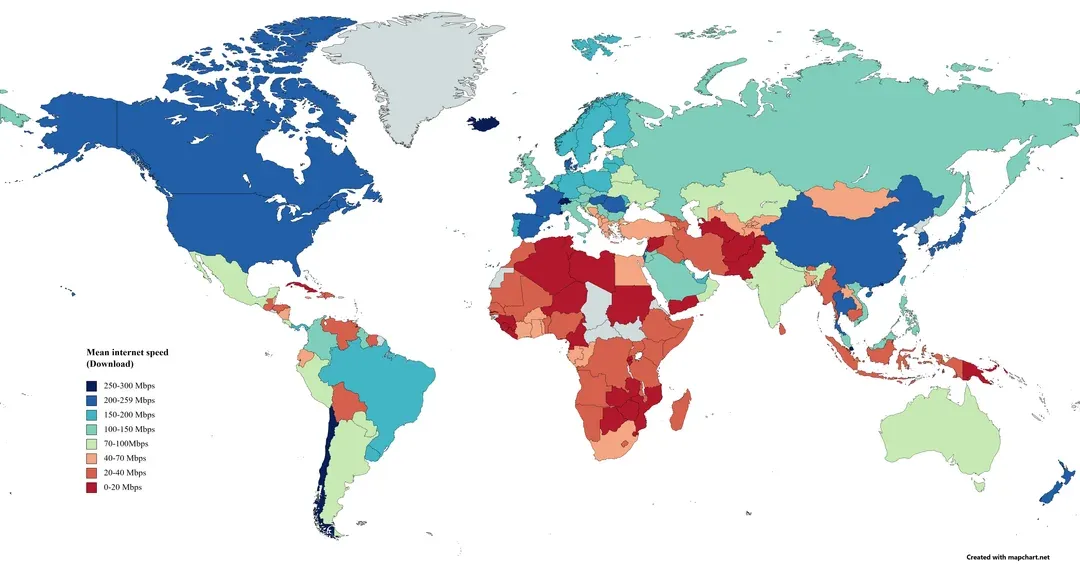
Yet, you can stream that quality over a phone connection. These days, you can see streamers or vloggers casually broadcasting their life across the entire internet. How is that possible?
Introduction to Video Codecs
A codec is an algorithm that is designed to turn raw, uncompressed video into far fewer bytes so that it can be transported easier. It comes with two different programs, an encoder and a decoder. The encoder is in charge of processing the video's raw, uncompressed frames and compressing them super efficiently. The decoder, on the other hand, is in charge of taking the encoded bytes from the network and then uncompressing them back into the original video frames. Anyone can write an encoder or decoder for a video codec, as long as it follows the codec's specification – a set of rules that basically states how the compressed bytes are aligned and what each byte means, so that the encoder and decoder are in parity.
The specification is great at laying down the rules, but it gives both the encoder and decoder lots of freedom beyond those rules. For example, the encoder could sacrifice compression efficiency for speed to process raw, uncompressed video faster. Oftentimes, lots of encoders and decoders have different types of modes that you can specify for different kinds of sacrifices, often known as presets.
Encoders and decoders don't have to be just written in software. In fact, pretty much all modern devices have hardware-accelerated encoders and decoders, meaning that there is an actual GPU chip designed for encoding or decoding content for that specific codec. GPU-accelerated encoding and decoding is often much faster and more power-efficient than software. There is a lot of research going into using other hardware, too, such as neural codecs that could use on-board device neural processing units (NPUs). In this blog, MCV2 has a software encoder and a GPU decoder (which is just a shader), since obviously manufacturers do not have a GPU chip designed for MCV2.

The world runs on codecs. Pretty much every frame on a screen today has gone through a codec of some sort. YouTube, Netflix, and Twitch send codec streams while streaming video, because without them, a single broadcast would cost terabytes of bandwidth. In video calls like FaceTime or Zoom, the encoder on both devices has to keep up live so the stream can adaptively fit to whatever network connection you have at the moment. iPhones encode video as you record. You may have recognized some of the most famous codec names, like H.264 (AVC), VP9 (Google), and AV1 (AOMedia). Later on this blog, I will compare MCV2 with all three.
Ideas Every Codec Use
Codec specifications differ heavily in their details, but they generally use the same fundamental ideas.
- Redundancy
- There is redundancy within each frame (spatial or intra-frame redundancy), where a region of blue sky with the same pixels could be described as "that whole area is blue," rather than storing each individual pixel.
- There is also redundancy between each frame (temporal or inter-frame redundancy). If the next frame is the exact same picture as the current frame, the codec could just say that the frame is the same, saving lots of data.
- Prediction
- Codecs often use prediction, where the decoder guesses part of a frame that it already has, and the encoded stream only corrects that guess. If the guess is good enough, that means there is less correction needed, and less data as a result.
- A frame that is predicted from an earlier frame is called a P frame (P stands for predicted). A frame that is predicted from both earlier AND later frames is called a B frame (B stands for bidirectional). And finally, a frame that does not need any other frame to describe it is called a keyframe or I frame (I stands for independent).
- Streams have to start with a keyframe, and it sends keyframes periodically to help viewers who missed a frame start playback.

- Motion
- When the camera moves, a part of the frame is still in the previous frame, just moved somewhere else. Codecs use a motion vector, which says something like "take the block of pixels from 1 pixel to the left and 3 pixels above in the reference."
- Finding the best vector is called motion search, and most of the encoder's time goes into searching.
- Blocks
- Before the codec applies compression techniques, it splits an entire frame into square blocks like 8x8 or 32x32 pixel sections, and then decides how to encode each block. Big blocks use less overall data, but describe detail worse. Smaller blocks use more data but describe detail much better.
- Modern codecs mix different block sizes so that busy regions use small blocks while static regions use large blocks to minimize detail loss. Each block uses a different encoding technique to maximize detail in the least amount of data possible for the current pixel context.

- Transforms and Palettes
- To describe the actual block's pixels in a few bytes, codecs use a transformation. A Discrete Cosine Transform (DCT) is applied to rewrite the pixels as a sum of smooth wave patterns.
- MCV2 uses a palette. A palette block says, for example, "this block uses only red and green," so we can use red for bit 0 and green for bit 1 within this block only. I'll explain later why.

- Quantization
- Quantization is the process of rounding colors or brightness values to a coarser step. For example, rounding a brightness value of 97 to the nearest multiple of 4 gives 96, an error of 1, but two bits less. Bigger steps mean fewer bits and a worse picture because of the loss of detail.
- Lossy codecs (meaning that the codec discards some of the original image data for much greater compression) take advantage of this. Lossless codecs (which keep all original data intact), like FFV1, cannot do this unless there is zero error.

- Entropy Coding
- Entropy coding writes the most common symbols with shorter codes and rare symbols with longer codes. One classic example is Huffman coding, but modern video codecs often use more advanced algorithms like arithmetic coding.

Measuring Quality
In order to compare codecs, we need to know how good the pictures are relative to the original pictures of the video.
- PSNR (Peak Signal-to-Noise Ratio)
- PSNR compares pixels directly by first taking the mean squared error (MSE) of every pixel, or the average of
(decoded value - original value)^2, and then applying it to this equation:10 * log10(255^2 / MSE) dB. Higher numbers are better. - PSNR is easy and super fast to compute, but it doesn't take into account what our eyes notice. A picture that is shifted by one pixel looks the same to our eyes, but has a terrible PSNR.
- PSNR compares pixels directly by first taking the mean squared error (MSE) of every pixel, or the average of
- SSIM (Structural Similarity Index)
- SSIM compares small neighborhoods of two pictures rather than singular pixels. It yields a value up to 1 and correlates with human visual perception much better than PSNR because it explicitly accounts for luminance, contrast, and structural patterns.
- The formula is much more complex, but you can find it at the linked Wikipedia page.
- VMAF (Video Multimethod Assessment Fusion)
- VMAF, built by Netflix, computes several measures of detail and motion, feeding them into a model trained on thousands of real videos. The result is a number from 0 to 100, where 90 and above has practically no visual difference, 70 to 80 is worse but still watchable, and 60 or below is bad. All the figures I generated for MCV2 were using VMAF.
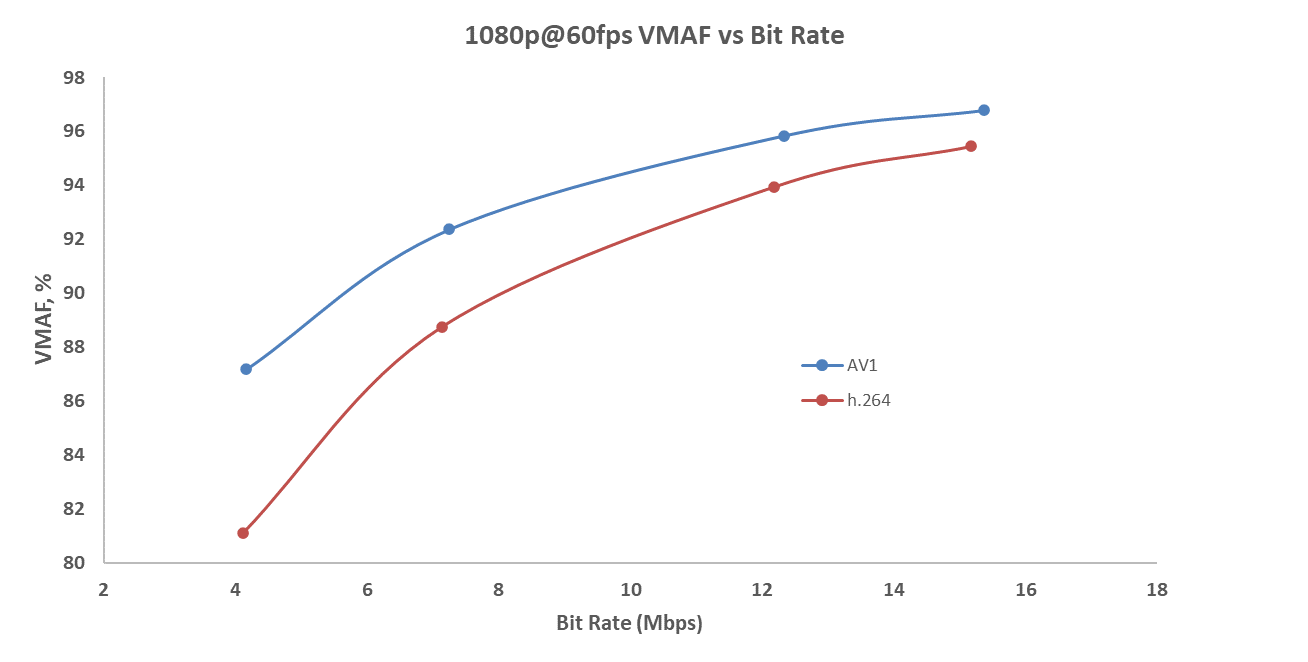
When you encode the same clip at different bitrates, you get different VMAF data points that you can graph to form a curve. A better codec's curve is higher and further left, because you can get a higher quality from the same bitrate.
BD-Rate (Bjøntegaard Delta Rate)
To compare two curves, you can calculate a number called the BD-rate, which is the average difference in rate between the two curves for the same quality, measured as a percentage. You take the logarithm of the bitrate (x-axis), fit a cubic polynomial through each of the adjusted data points, and then take the average gap between the two fitted curves to compute the percentage. Netflix provides scripts to calculate this automatically.
The figure below calculates it for PSNR, but you can calculate it for SSIM or VMAF as well. When you compare both curves, you take the area in between the curves, divide it by the range of the quality metric, and then use the formula (e^d - 1) * 100% to get the final percentage.

MCV2 Codec
Video Streaming in Minecraft
In Minecraft, a map is an item that displays a 128x128 picture. You can place these 128x128 maps together to create a large screen. The server sends each map's picture to the client in map packets, allowing us to use these maps as a medium to display video.

A Minecraft map's picture isn't RGB, because each pixel is a specific color from a custom palette. Each pixel is one byte, which represents the palette index out of the 248 map colors as of version 26.3. One map is around 16 kilobytes, and to show a 1080p picture, you would need 1920 / 128 = 15 maps wide and 1080 / 128 = 8.4 or 9 maps high (you can only have integer maps). This comes out to be 135 maps, or 135 * 16 or 2.2 megabytes.
MCAV (the original video streaming project) and many other video streaming projects originally played video on maps by dithering. By using an error-diffusion algorithm like Floyd-Steinberg or Sierra Filter Lite, you could reconstruct the original full RGB picture into a somewhat good-looking image by arranging pixels of the reduced Minecraft palette in a clever way. The first picture below is the original picture, and the second picture is one that was dithered with a reduced palette.


Using Xiph's MINECRAFT.y4m test media, we can see that with basic dithering, we can only reach a VMAF score of 10.9 (yes, 10.9) at approximately 11 Mbit/s, which is horrible. This already includes some inter-frame and intra-frame compression. In order to achieve our highest VMAF score (99.5), we have to send 178.3 Mbit/s for every change. No server has the capacity to upload that much bandwidth for several players simultaneously.
Modifying the Minecraft client could allow us to decode video with anything, but then players would have to go through the hassle of installing a mod and setting it up. Minecraft, however, has a built-in feature called a resource pack, which the client can load without any manual installation. Since Minecraft renders maps using shaders – small programs running on the GPU written in GLSL – we can replace the shader that draws the map itself with a custom MCV2 decoder. Furthermore, Minecraft uses post-effects (a chain of full-screen shader passes) to draw outlines around glowing entities. By marking a post-effect's render targets as persistent, they survive from one rendered frame to the next, giving us a place to store the previous decoded picture so that P-frames are possible.
That's all we get. No other storage, files, external network access, or compute shaders. The decoder has to be a fragment shader: a program the GPU runs independently for every pixel it draws simultaneously, with individual pixels unable to see what others computed. That single constraint shapes the entire codec. Because of it, MCV2 cannot use:
- An entropy coder whose state runs sequentially through the stream, since a pixel would have to decode every preceding symbol before its own.
- Neighboring block prediction, because those neighbors are being decoded at the exact same moment.
- Complex transforms, which only pay off when paired with an entropy coder.
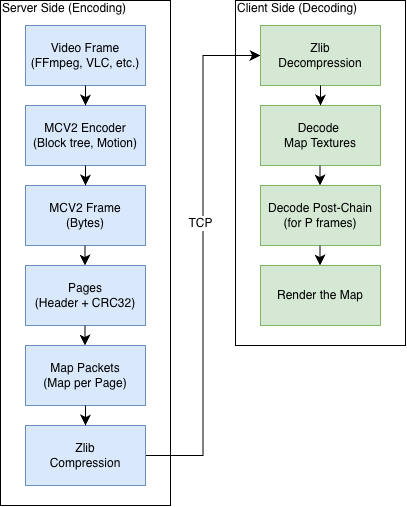
The server transmits each map picture inside a map packet. Minecraft automatically compresses these map packets using zlib before sending them across the network, where the client then decompresses them. Consequently, the MCV2 bitrate is measured after zlib compression, representing the true bandwidth consumption on the wire.
The figure below shows the entire pipeline from server frame retrieval to client display.
MCV2 Specification
Before we get into the format itself, all numbers are unsigned little-endian integers. The offset is just the position in frame bytes relative to the 0th byte, and the size tells you how many bytes that header field takes up. Assume all bytes are unsigned unless explicitly stated.
I gave up on adding hyper-links after this paragraph ☹️
For decoder validation, you must assume that the frame is broken or even malicious, so check for valid bytes via the specification before using it. The reference decoder on the GitHub repository is pretty good at validation, but just for your information, if you ever decide to build a decoder for MCV2 for whatever reason, please assume corrupted or malicious data!
Frame Header
The frame header starts with 20 bytes.
| Offset | Size | Field | What it holds |
|---|---|---|---|
| 0 | 4 | magic | 0x3256434D (MCV2) |
| 4 | 4 | version | 0x3 (3) |
| 8 | 2 | width | picture's pixel width from 1 to 4096 |
| 10 | 2 | height | picture's pixel height from 1 to 4096 |
| 12 | 4 | frame id | current frame count |
| 16 | 4 | reference id | the frame a P frame predicts from |
To check if a frame is a keyframe (I-frame), the decoder simply checks if the reference id equals the frame id. Frames are also validated against the length of whatever carries them – whether that's the map pages they arrived in or a file's length prefix. If an older version header is encountered, the frame is refused with an error message.
The frame id increments by one for every new frame. Because it's a 32-bit unsigned integer, it wraps around back to 0 once it hits the integer limit.
A predictive frame (P-frame) points to its reference ID to indicate what it predicts from. If the decoder doesn't have that required reference frame, it refuses to decode and simply keeps displaying whatever picture it currently holds. Following this design, every P-frame written by MCAV predicts strictly from the frame immediately preceding it.
Superblocks and the Block Tree
The picture is cut into superblocks of 32x32 pixel squares, counted in rows from the top left. A picture will have ceil(pixel width / 32) superblocks per row, where the i-th superblock has its top-left corner at (32 * (i % columns), 32 * floor(i / columns)).
As an example, a 1920x1080 picture has 60 columns and 34 rows, or 2,040 superblocks. Since 1080 isn't a multiple of 32, the last row of superblocks bleeds 8 pixels underneath the picture.
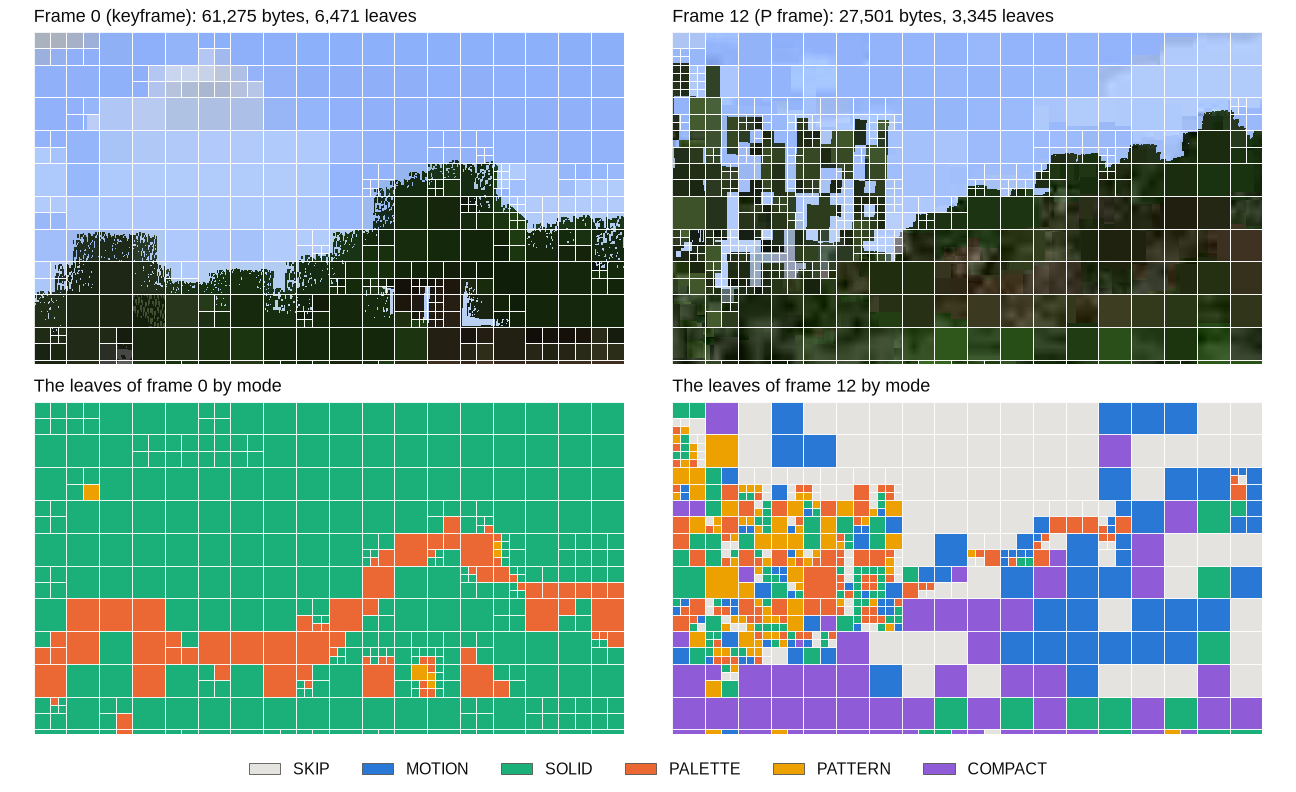
Each superblock is a small tree, where the root is the 32x32 square itself. A square is either a leaf or splits into four squares of half its size from top left, top right, bottom left, and bottom right. Since only 32 and 16 pixel squares can split, every leaf is only 32, 16, or 8 pixels across. In very noisy areas, you can see MCV2 split into multiple smaller superblocks to adjust for the increased detail.

Leaf Encoding Types
If you look at the figure above, each block has a different color based on the leaf mode it used. It's the encoder's job to determine which mode works best to maximize detail while maintaining optimal compression. There are currently 7 different leaf encoding types. In the table below, each leaf has its own mode number and record, which is the additional information it needs to store. Here, s represents the current block size (32, 16, or 8 pixels).
| Mode | Name | Record | Allowed in | What the decoder draws |
|---|---|---|---|---|
| 0 | SKIP | nothing | every frame | P frame: the same pixels as the reference. Keyframe: black |
| 1 | MOTION | 2 signed bytes | P frames | the reference, moved |
| 2 | SOLID | 3 bytes | every frame | one color |
| 3 | PALETTE | 6 + s²/8 bytes | every frame | two colors, a bit per pixel says which |
| 4 | PATTERN | 7 + s/8 bytes | every frame | two colors in stripes |
| 5 | COMPACT | 10 bytes | P frames | the reference, moved, plus a small correction |
| 6 | SPLIT | (none) | 32- and 16-pixel squares | four smaller squares |
SKIP costs nothing except its current location data. In a P-frame, it shows the exact same square as the reference. A keyframe has no reference, so a skipped square defaults to black.
MOTION has two signed bytes, dx and dy. Every pixel (x, y) in this block will show the reference frame's pixel at (x + dx, y + dy). If (x + dx, y + dy) falls outside the picture bounds, it clamps to the nearest edge pixel (for example, if it goes too far to the right, it clamps to the rightmost edge pixel, and so on). Both dx and dy are integers.
SOLID uses three unsigned bytes representing red, green, and blue. Every pixel in the block is filled with that exact color.
PALETTE stores two colors via six unsigned bytes (R0, G0, B0, R1, G1, B1), followed by one bit per pixel, arranged row by row. This is a 1-bit palette, so a 0 bit selects the first color, while a 1 bit selects the second color. An 8x8 palette block takes 14 bytes total, a 16x16 palette block takes 38 bytes, and a 32x32 palette block takes 134 bytes.

PATTERN stores two colors via six unsigned bytes (R0, G0, B0, R1, G1, B1), followed by an orientation byte where 0 means vertical stripes decoded from left to right and 1 means horizontal stripes decoded from top to bottom. This is followed by s / 8 bytes where each bit sets the color for an entire row or column, shrinking storage down to just 8 bytes for an 8x8 pattern, 9 bytes for a 16x16, and 11 bytes for a 32x32, instead of using a full palette.
COMPACT a correction on top of a moved copy of the reference: "take this block from the last frame, shift it by dx and dy, and tweak the brightness." It's how MCV2 handles things that move and change slightly at the same time.
Its record is always 10 bytes: dx and dy take up two signed bytes (just like MOTION), followed by 8 bytes packed with 16 brightness changes laid out on a 4x4 grid (two values per byte). That 4x4 grid gets smoothed out across the whole leaf no matter its size, so those 16 numbers describe a gentle brightness shift across an 8x8 or a 32x32 block. The exact same adjustment is added to red, green, and blue so the block gets lighter or darker without shifting its color. Finally, a quantizer q (which can be 0, 1, or 2) scales the correction by 2^q, meaning q = 0 gives steps of 1 while q = 2 scales it up to steps of 4.
SPLIT just tells the leaf node that there are smaller pixel squares.
Leaf Reconstruction
Every leaf is drawn completely on its own, meaning no leaf ever looks at or depends on a neighboring leaf. Here are the exact rules:
For any prediction mode (like SKIP, MOTION, or COMPACT), pixel (x, y) with vector (dx, dy) grabs its reference pixel at (clamp(x + dx, 0, image_width - 1), clamp(y + dy, 0, image_height - 1)).

For COMPACT, the 16 brightness values live in a 4x4 grid packed into 8 bytes right after the motion vector (two 4-bit signed values per byte), mapped across the leaf size s using t = (p + 0.5) * 4 / s - 0.5 (maps pixels to a 4x4 grid) and blended via bilinear interpolation to yield a fine-tuned correction Y. Each color channel then modifies the reference pixel with v = P + 2^q * Y (reconstructs the original color), rounding halves up (floor(v + 0.5)) and clamping between 0 and 255. This approach remains mathematically exact because Y always resolves to clean fractions (multiples of 1 / (4s^2)), friendly for the GPU.
Pixel to Leaf Indexing
Indexing exists only because of the fragment shader. Every pixel is decoded by its own program at the same time as others, so each program needs to know which leaf they are in and where that leaf's bytes are.
The index sits right after the header. For R superblocks, G = ceil(R / 32) superblock groups, C = ceil(G / 8), and D total descriptors, the layout is:
| Part | Bytes | What it holds |
|---|---|---|
| presence masks | 4 * G |
A 32-bit mask per group: bit b is 1 if superblock 32g + b is present |
| directory | 4 * C |
Cumulative present superblocks for every eighth group |
| level counts | 12 | Three 32-bit integers (n0, n1, n2) for 32-, 16-, and 8-pixel square counts |
| descriptors | D |
One byte per square, stored in level order |
| walk checkpoints | 4 * ceil(D / 8) |
One 32-bit checkpoint per eight descriptors |
The payload records begin immediately after the original frame header and this layout, running consecutively until the end of the frame.
If a superblock's presence bit is 0, it isn't stored at all and defaults to a 32x32 SKIP. On a still picture, most bits are 0, allowing an entire static 1080p P-frame to compress down to just the header and a ~300-byte index. To find a superblock's descriptor, the shader combines the directory count for its group of eight with a hardware-friendly bit-counting popcount trick across the intervening masks.
A descriptor is a single byte (mode + 32 * q), where the low five bits store the mode and the high three bits store the quantizer q (reserved only for COMPACT). Descriptors are stored in level order:
- Level 0 (
n0): One for every present superblock. (32x32) - Level 1 (
n1): The four children of every Level-0 split (n1 = 4 * splits in Level 0). (16x16) - Level 2 (
n2): The children of every Level-1 split. (8x8)
A descriptor's position tells its size (32 if index < n0, 16 if < n0 + n1, otherwise 8), and its children always begin at n0 + 4 * (splits before this descriptor).
To find a record's (leaf mode data) byte offset without scanning from the start, every eighth descriptor includes a 32-bit checkpoint containing a 17-bit cursor byte offset and a 15-bit split count. Starting from the nearest checkpoint, a pixel walks over at most seven descriptors, summing their record lengths and counting splits. Because record sizes follow directly from their mode and size, no pixel ever needs more than three rounds of at most seven steps to locate its exact payload bytes.
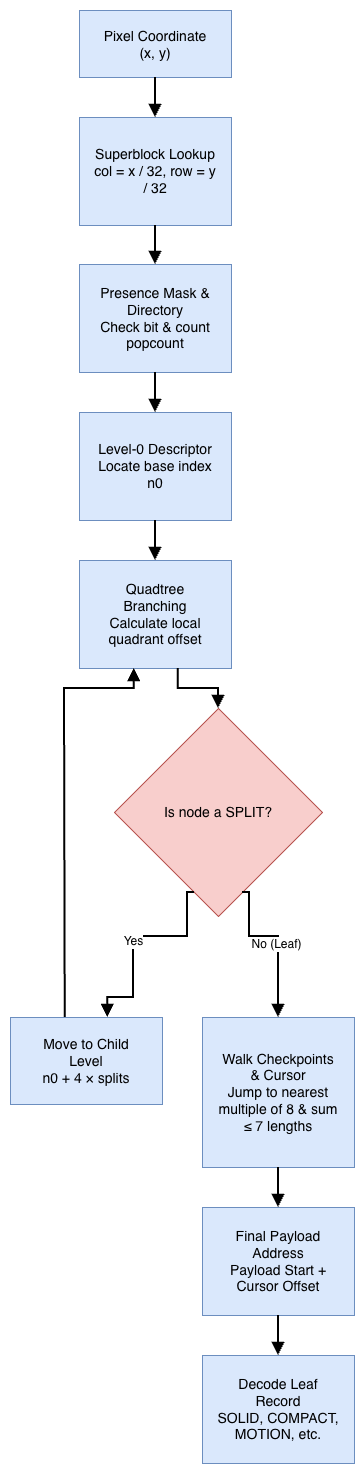
To make this easier to understand for you, here's an example. Let's say we have a 96x64 picture. There are 6 superblocks, since 96 / 32 is 3 columns and 64 / 32 is 2 rows. Let's say superblocks 0, 2, 3, and 5 are present, so the presence mask captures those bits (2^0 + 2^2 + 2^3 + 2^5 = 45), and n0 = 4 since there are 4 present superblocks. Superblock 2 is split, and its bottom-right child is split again, so n1 = 4 and n2 = 4 (12 descriptors total, two walk checkpoints).
| Descriptor | Square | Mode | Record bytes | Checkpoint |
|---|---|---|---|---|
| 0 | superblock 0 | SOLID |
3 | 0: cursor 0, splits 0 |
| 1 | superblock 2 | SPLIT |
0 | |
| 2 | superblock 3 | MOTION |
2 | |
| 3 | superblock 5 | SOLID |
3 | |
| 4 | 16x16 at (64, 0) |
PALETTE |
38 | |
| 5 | 16x16 at (80, 0) |
SOLID |
3 | |
| 6 | 16x16 at (64, 16) |
COMPACT |
10 | |
| 7 | 16x16 at (80, 16) |
SPLIT |
0 | |
| 8 | 8x8 at (80, 16) |
SOLID |
3 | 1: cursor 59, splits 2 |
| 9 | 8x8 at (88, 16) |
... |
How do we find which leaf pixel (80, 20) belongs to? We can find its superblock column and row by just dividing by 32, since superblocks are always 32x32 pixels. 80 / 32 = 2, row 20 / 32 = 0, so the superblock is number 2. Bit 2 of the mask is set, so it's present (not SKIP), and counting the bits below it gives 1, so descriptor 1 (SPLIT).
Superblock 2 starts at pixel coordinate (64, 0) according to the table above. Since this superblock is a SPLIT, we need to subtract the top-left corner's coordinates to get us local coordinates relative to this superblock. We can subtract 64 from the x-coordinate and 0 from the y-coordinate, so (80 - 64, 20 - 0) or (16, 20) relative to our superblock. We can use the formula n0 + 4 * (splits before this) to calculate the descriptor, which would be 4 + 4 * 0 plus the child index of 3 to get descriptor 7.
To find its record offset, we walk from checkpoint 0 over descriptors 0 through 6, summing their lengths (3 + 0 + 2 + 3 + 38 + 3 + 10 = 59) and noting 1 prior split. Descriptor 7 is also a SPLIT, dividing its 16x16 block (at (64, 16)) into four 8x8 squares. The local coordinates (16, 4) place it in the top-right quarter. Its children start at 4 + 4 * 1 = 8, pointing to descriptor 8. Checkpoint 1 already holds a cursor of 59 and 2 splits, so descriptor 8 (SOLID) finds its 3 bytes right at payload start + 59.
The reason why indexing is so complex is because of the GPU fragment shader restriction. In a CPU video decoder, everything is sequential, so you can keep a running state and know where you currently are. But a fragment shader runs millions of independent programs in parallel at the same time, and it can't ask neighboring pixels what it just decoded. Therefore, I had to find a fast way for programs to find their own leaf node without bloating file size, and the best way was using tree indexing and checkpoints.
I understand that this part might be hard to understand since it's MCV2-specific, but if you have any questions, please comment below.
Example Frame
Here is an example frame for a 64x32 pixel image of the sky of the edge of a cloud.

offset  bytes
     0  4d 43 56 32 03 00 00 00 40 00 20 00 00 00 00 00
    16  00 00 00 00 03 00 00 00 00 00 00 00 02 00 00 00
    32  04 00 00 00 00 00 00 00 02 06 02 02 02 04 00 00
    48  00 00 91 b2 fa 91 b2 fa 97 b6 f9 91 b2 fa 92 b3
64 fa bc ce f6 00 f0 ff| Offset | Bytes | Field | Value |
|---|---|---|---|
| 0 | 4d 43 56 32 |
magic | MCV2 |
| 4 | 03 00 00 00 |
version | 0x3 |
| 8 | 40 00 |
width | 0x0040 = 64 |
| 10 | 20 00 |
height | 0x0020 = 32 |
| 12 | 00 00 00 00 |
frame id | 0 |
| 16 | 00 00 00 00 |
reference id | 0, its own id: so it's a keyframe |
| 20 | 03 00 00 00 |
presence mask | bits 0 and 1 are set: both superblocks are present |
| 24 | 00 00 00 00 |
directory | no present superblocks before the first group |
| 28 | 02 00 00 00 04 00 00 00 00 00 00 00 |
level counts | n0 = 2, n1 = 4, n2 = 0 |
| 40 | 02 |
descriptor 0 | SOLID: superblock 0 is one colour |
| 41 | 06 |
descriptor 1 | SPLIT: superblock 1 becomes four 16x16 squares |
| 42 | 02 02 02 04 |
descriptors 2 to 5 | SOLID, SOLID, SOLID, PATTERN, in the order top left, top right, bottom left, bottom right |
| 46 | 00 00 00 00 |
walk checkpoint 0 | cursor 0, splits 0 |
| 50 | 91 b2 fa |
superblock 0's SOLID | (145, 178, 250), the sky |
| 53 | 91 b2 fa |
the top left SOLID | the same sky |
| 56 | 97 b6 f9 |
the top right SOLID | (151, 182, 249) |
| 59 | 91 b2 fa |
the bottom left SOLID | the sky again |
| 62 | 92 b3 fa bc ce f6 00 f0 ff |
the PATTERN | colours (146, 179, 250) and (188, 206, 246), orientation 0, and the column bits f0 ff |
Pages on Maps
If you recall earlier, in Minecraft, you have to arrange multiple 128x128 maps together in order to form a large screen. Each of these maps must be handled separately, and the server must send each map as its own independent packet, which I call a page. A full frame from above doesn't just get sent to the client as a single massive blob – MCV2 instead splits the frame into pages. Each page has its own 32-byte header followed by a slice of the frame's compressed data that makes up that part of the picture:
| Offset | Size | Field | Rule |
|---|---|---|---|
| 0 | 4 | magic | MCP1 |
| 4 | 1 | version | 0x1 |
| 5 | 1 | symbol bits | 0x6 |
| 6 | 2 | frame type | 1 for a keyframe, 0 for a P frame |
| 8 | 4 | stream id | chosen by the server |
| 12 | 4 | frame id | the frame's id |
| 16 | 2 | page number | below the page count |
| 18 | 2 | page count | how many pages the frame has |
| 20 | 4 | reference id | the frame's reference id |
| 24 | 4 | frame length | 20 to 131,071 |
| 28 | 4 | CRC32 | a checksum of the header and the page's slice |
CRC32 is a 32-bit checksum, which is an integrity check on the of the entire header and page slice. The client re-calculates the CRC32, and throws corrupted pages away.
To get these bytes across Minecraft's network protocol, we can't just send raw binary files because we need to "smuggle" them inside Minecraft's map packets. A page's bytes are read as one long continuous row of bits, starting with the lowest bit of each byte first, and then chunked into groups of six to form symbols ranging from 0 to 63. A single page holds at most 12,256 frame bytes because (32 + 12,256) * 8 / 6 = 16,384 symbols, which fills a 128x128 map perfectly, since 128 * 128 = 16384.
I send symbol v as the map pixel color v + 4 (colors 4 through 67, covering the four shades of base colors 1 through 16). All 64 of these RGB colors are unique, so the client's fragment shader can read them back. While Minecraft has 244 opaque map colors (as of 26.3) that could technically carry almost 8 bits per pixel, a symbol has to be reliably read back from whatever color the client draws on screen, so we stick to these 6-bit values.
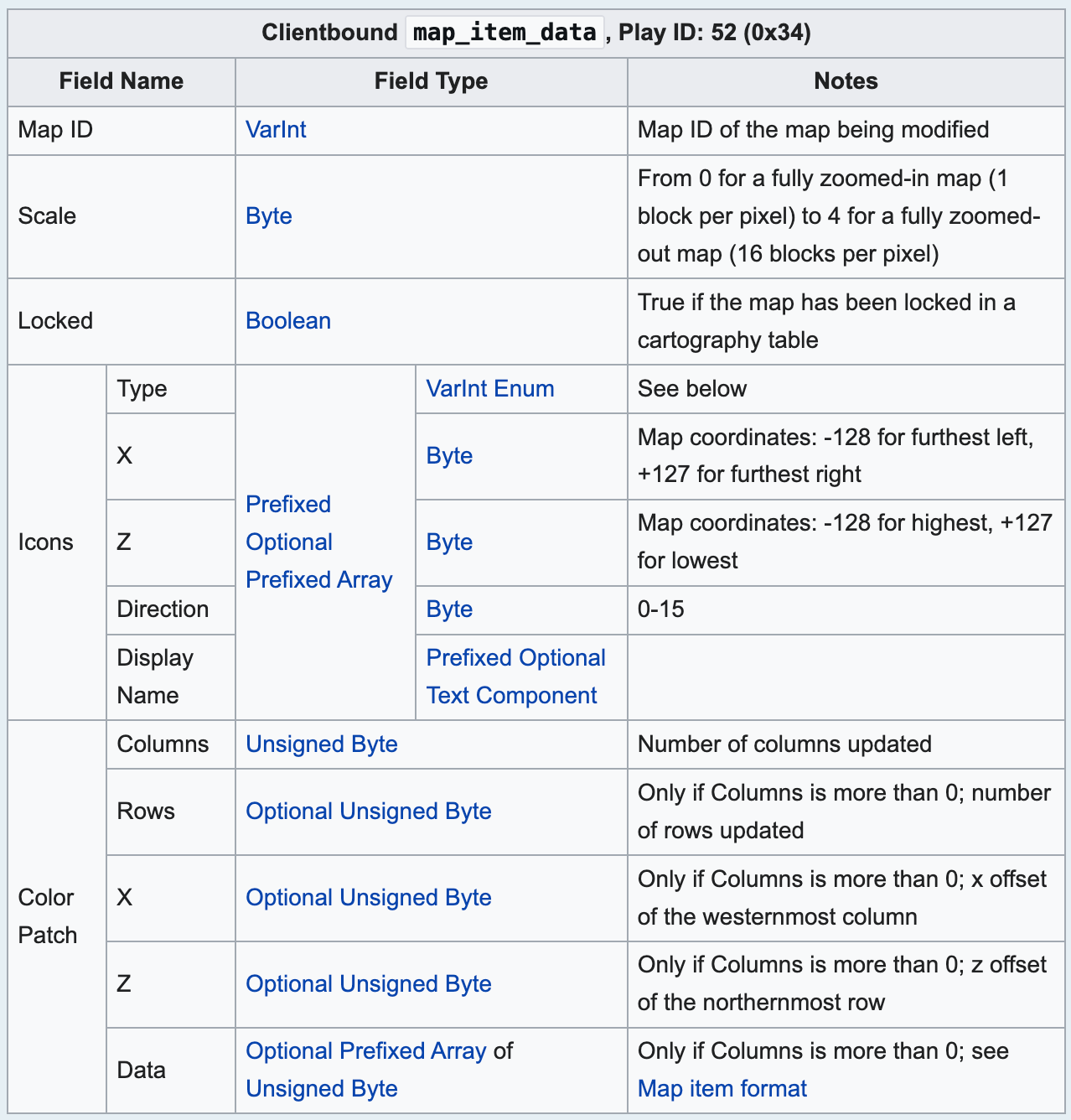
The server writes page n of a frame into the top rows of the map numbered pageMap + n. Each page goes out as its own map packet, and the server bundles all pages for a frame together so they arrive simultaneously. Timing is a bit tricky since packets sent from a plugin wait until the next in-game tick (a Minecraft-specific mechanic where a second is divided into 20 game loop cycles, and things like packets can only be sent at each cycle). This would mean that while playing any video that's greater than 20 frames per second, two frames will often reach the client together; if that happens, the client drops the first, can't decode the second because it missed its reference frame, and freezes until the next keyframe.
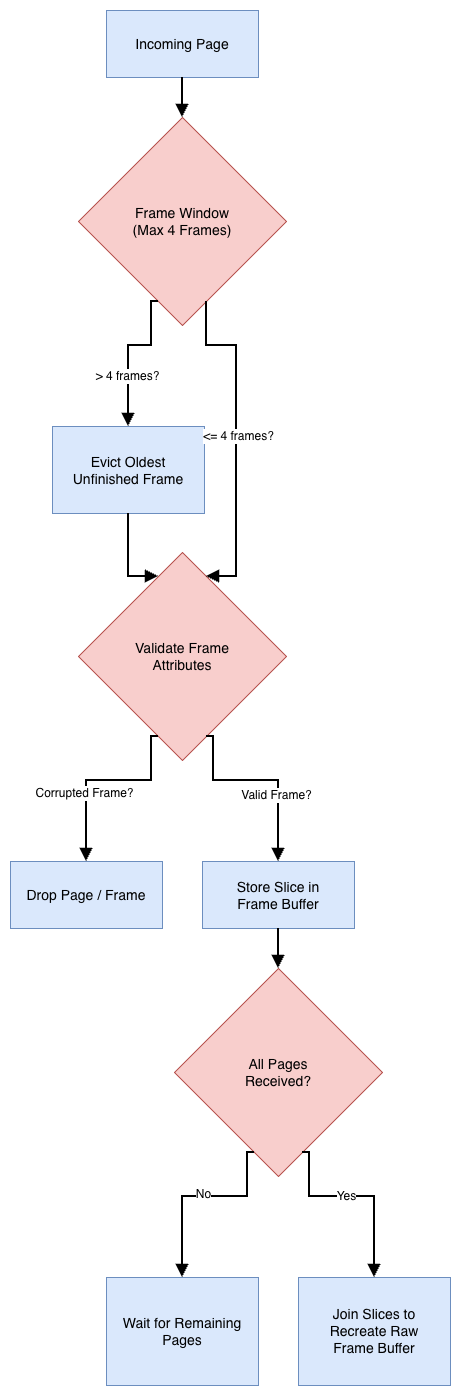
Because network packets aren't perfect, pages can arrive out of order. The client keeps track of at most four unfinished frames like a window, and a page for a fifth frame evicts the oldest one. Every incoming page has to agree with the ones already stored for that frame, matching the page count, reference ID, length, and type, and if a duplicate page doesn't match byte-for-byte, it gets dropped. Once every page for a frame is accounted for, their slices are joined back together in order to recreate the raw frame buffer.
Encoding a screen once for multiple players is efficient, but every viewer has a different network connection. To take that into account, the server manages separate outbound links per viewer, only sending a frame if that viewer can actually decode it. In this case, that means that a keyframe, or a P-frame whose reference frame was sent to them earlier. The server also has a buffer limit, so it doesn't flood a lagging player connection with unsent video. That way, they can just skip ahead to the next decodable frame if they fall behind to sync up with everybody else.
Fragment Shader Decoding
The post chain runs on every single rendered frame while a page frame is in view. If a frame is incomplete, damaged, or missing its reference, it's never decoded – the client simply keeps showing the last picture it drew.
Minecraft runs the post effect post_effect/entity_outline.json after drawing the map, and post effects can declare render targets as "persistent": true, allowing them to survive from one frame to the next. We can use this to give our decoder some place to store the reference picture. In game, every screen hides its page frames behind the wall as invisible item frames holding the maps that glow on their own. The final pass of our post chain removes their outline color so viewers don't see them.
The pack's core/text.vsh vertex shader intercepts every map the client draws. A page map is recognized by a special signature (MCP1) at its start. Its square is moved to its own slot in a strip of rows right at the top of the screen, and core/text.fsh writes its symbols there unchanged – packing four six-bit symbols into the three RGB bytes of a single screen pixel. A symbol represents its color's place among the 64 map colors. Both shaders find with a read from a 256-entry table generated by the server when building the pack.
The screen's maps have anchor patches in their top rows containing a signature, their column and row on the wall, the wall's size and facing direction, and a checksum. The vertex shader of any visible anchor writes the wall's corner, its direction vectors, and the camera's projection matrix into a row of the strip.

Each pass of the post chain is a fragment shader run over a small target.
- Bytes: reads the strip back into raw frame bytes.
- CRC: recomputes every page's CRC32 in chunks of 192 bytes
- Pages: validates every page header and checksum.
- Status: decides whether the current frame brings a complete, undamaged, new frame the client can decode.
- Resolve: one fragment per 8x8 cell of the picture uses the index to find that cell's leaf.
- Decode: one fragment per pixel draws the pixel from its leaf (
SKIPandMOTIONgo straight to the held picture, while other leaves read only their own record). - Copy and State: saves the new picture and its frame ID into persistent render targets for the next frame to predict from.
- View and Screen: computes where the wall sits on the screen and draws the decoded picture over it.
- Outline: removes the page frames' glow.
All of that code is in assets/mcav/shaders/include/mcv2.glsl. Because Minecraft's post-effect format demands a distinct program file for every pass, each pass uses a stub file that defines its specific pass macro and includes the core file.
#version 330
#extension GL_ARB_separate_shader_objects : require
#define MCV2_PASS_DECODE
#include <mcav:mcv2_config.glsl>
#include <mcav:mcv2_screen.glsl>
#include <mcav:mcv2.glsl>
The configuration files (mcv2_config.glsl, mcv2_screen.glsl, and mcv2_alphabet.glsl) are generated by the server when it builds the pack and just hold constants.
The server builds and serves the pack for pack format 97 (Minecraft 26.3). The shader code is fixed. One single resource pack can decode up to eight MCV2 screens simultaneously. The resource pack is optional, so players who decline it simply see the standard dithered maps on the wall. Minecraft 26.3 compiles every shader through SPIR-V and back into GLSL 330, and the pack is engineered specifically for that path.
The pack keeps exactly one picture per screen, which is the last frame it decoded. A client that misses frames cannot decode subsequent P frames and freezes on the last picture until a frame arrives while a keyframe is the newest frame available.
Software Encoding
You still hanging on? Don't worry, this is the last section before the results. 😄
The format only specifies what the bytes mean, and it's the encoder's job to encode them in that way. MCAV's encoder is the MCV2 class, and it's fast enough to encode 1080p video while it's playing.
A frame becomes a keyframe if there is nothing to predict from. Some examples are the first frame of a new size, a viewer who just started watching, or a viewer who missed something. Every other frame is a P frame that predicts from a reference frame like above.
For every 32x32 and 16x16 square of a P frame, the encoder tries to predict the best motion vector from the last picture (motion search). Trying every vector is too slow, so we use a heuristic algorithm.
- We first try good guesses. Things that moved last frame are usually still moving, so we start with vectors this square and its neighbors.
- We search small pictures as well, so pictures shrunk to half of their width and height, and then refine the vector at its full size.
- From the best point so far, we try points one step away up, down, left, and right, and move to the best, and repeat until no neighbor is better.
For every square, the encoder tries different of the leaf modes to code it, called candidates. These are the same modes that I described earlier. To compare them fairly, each one is given a cost factor, where cost = D + λ × (8 × record bytes + 12).
Dstands for the distortion, or how wrong the drawn square is. I calculate this by summing over the squared differences from the source in YCoCg, since brightness errors are worse than color errors.8 * record bytes + 12is each leaf's record size in bits, and 12 bits is what a leaf costs in the index.λis the price of one bit, in units of squared error. The default is 72, but on the fast preset, it is 55.
The cheapest candidate wins. On a tie, the first one that is tried is used.
In the encoder, each leaf mode has its own encoding strategy. Palettes use a tiny version of k-means clustering, where we start with the darkest and brightest pixels as the two colors, and then move each color to the average of its pixels. For patterns, we just check if every row or column of a palette's bits is the same. And for compact grids, the 16 grid values are fitted by least squares. You can view the full implementation in the encoder.
Every superblock's search depends only on the source frame and last picture, and never any neighbors, so the encoder hands superblocks to all possible threads at once, and then gathers the results in order. For some loops that run billions of times (like draw this leaf and get the error), they are written in C++ with the processor's vector instructions.
Results

Minecraft proxy represents a procedurally generated 1080p 30 frames per second clip with flat regions and hard edges. Minecraft gameplay represents the MINECRAFT.y4m clip we tested earlier, which has a lot of motion. MCV2 loses to most modern codecs, which is expected (the goal of MCV2 wasn't to beat them anyways). In comparison to our dithered maps, the gameplay clip reaches nearly 75 VMAF at 10 Mbit/s, which is so much better than the 10.9 VMAF at 11 Mbit/s from dithered maps earlier. If we weren't restricted to a fragment shader, we could squeeze a lot better compression efficiency out of the codec.
As for how much each of our features saved, I calculated the BD-rate of each. Some tools perform better under the proxy rather than the gameplay, as expected, because the video is different.

The decoding and encoding times are based off the same proxy and gameplay clips above
In terms of decoding, on an Intel UHD 630 (with an integrated GPU), it takes around 5 to 6 milliseconds to decode a new P frame or keyframe. For no new video, it takes 4 to 5 milliseconds. For a game running at 60 frames per second, there is approximately 1 second / 60 frames or 16.7 milliseconds of decode per frame. This beats that amount generously, so we wouldn't really have an issue decoding high frame rate video.
For encoding, however, it's much more expensive. On a 6-core i7-8700 with 12 threads, the 95th percentile time to encode a frame was around 10 ms to 16 ms on the DEFAULT preset, and 10 ms to 14 ms on the FAST preset. From our same calculation above, both presets give us barely some breathing room to decode 60 frames per second video.
Conclusion
That's it! That's the entire MCV2 codec explained (are you still reading this even?). Hopefully you weren't bored too much...
The reference encoder (Java) and decoder (Java & GLSL) can be found in the MCAV repository. If you have any comments or questions, feel free to ask below! Thank you!



Comments ()