Engineering Software AV1 HDR Playback and GPU Shaders on YouTube Android
AV1 Adoption at YouTube
When I was at YouTube, one of our top priorities was giving our users the best watch experience possible no matter their device or bandwidth. Video streaming playback consumes a lot of bandwidth, so there is no doubt that a video compression codec is necessary.
Previously, a lot of videos uploaded onto YouTube were transcoded into the H.264 (Advanced Video Coding) codec. H.264 was a large milestone for its time, but it is over twenty years old, and while it is technically "free internet," commercial distributors still had to pay streaming royalty fees.
AV1 vs. Its H.264 Predecessor
Last summer, I was a software engineering intern working on the YouTube Android App on a team called Media Technologies. Our team's OKR (Objectives and Key Results) was to increase the watch time of a video codec called AV1 (AOMedia Video 1). AV1 is an open, royalty-free codec that was developed by the Alliance for Open Media (AOMedia) to promote accessibility and affordability. AV1 offers 30-50% better compression efficiency compared to H.264, meaning it delivers the same visual quality at almost half of the file size or bitrate. This means that just migrating from H.264 to AV1 itself could translate to massive egress and bandwidth savings for YouTube.
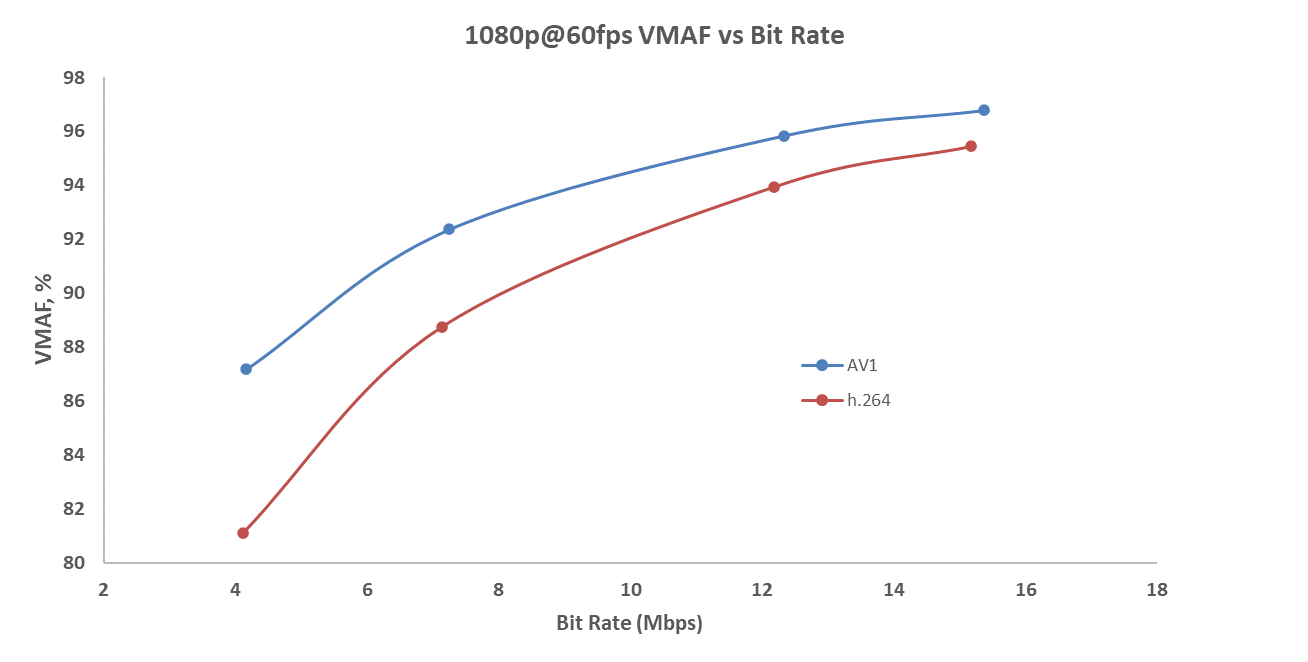
Below is a diagram comparing the VMAF (Video Multi-Method Assessment Fusion) scores of a 1080p@60 FPS video between H.264 and AV1. VMAF, in essence, is a way to rate the video quality based on how we as humans perceive the video. It's scored between 0 to 100, where higher scores indicate little-to-no difference to our eyes and lower scores indicate very visible compression artifacts. Results vary between different VMAF models and video content; however, the graph below highlights how AV1 scores a higher VMAF than H.264 in all bit rates, and even more when the bit rate is low.
So AV1 is awesome, but the specification was released 8 years ago. Today, AV1 accounts for a massive chunk of YouTube watch time (you can see whether or not the video you are watching right now is AV1 by checking Stats for Nerds). Why did adoption take so long?
The Adoption Gap
This comes with multiple reasons, both on the server and client side. On the server side, in order to serve AV1 content, YouTube has to take the video you upload and transcode it. One of the best ways to do this is via hardware-accelerated GPUs that are designed to encode this content, but that did not exist at the time, because hardware support always falls behind. AV1 itself is also much more computationally complex than H.264, which translates into the silicon itself, meaning lots of chip vendors were reluctant in investing time and money into a codec that is barely used.
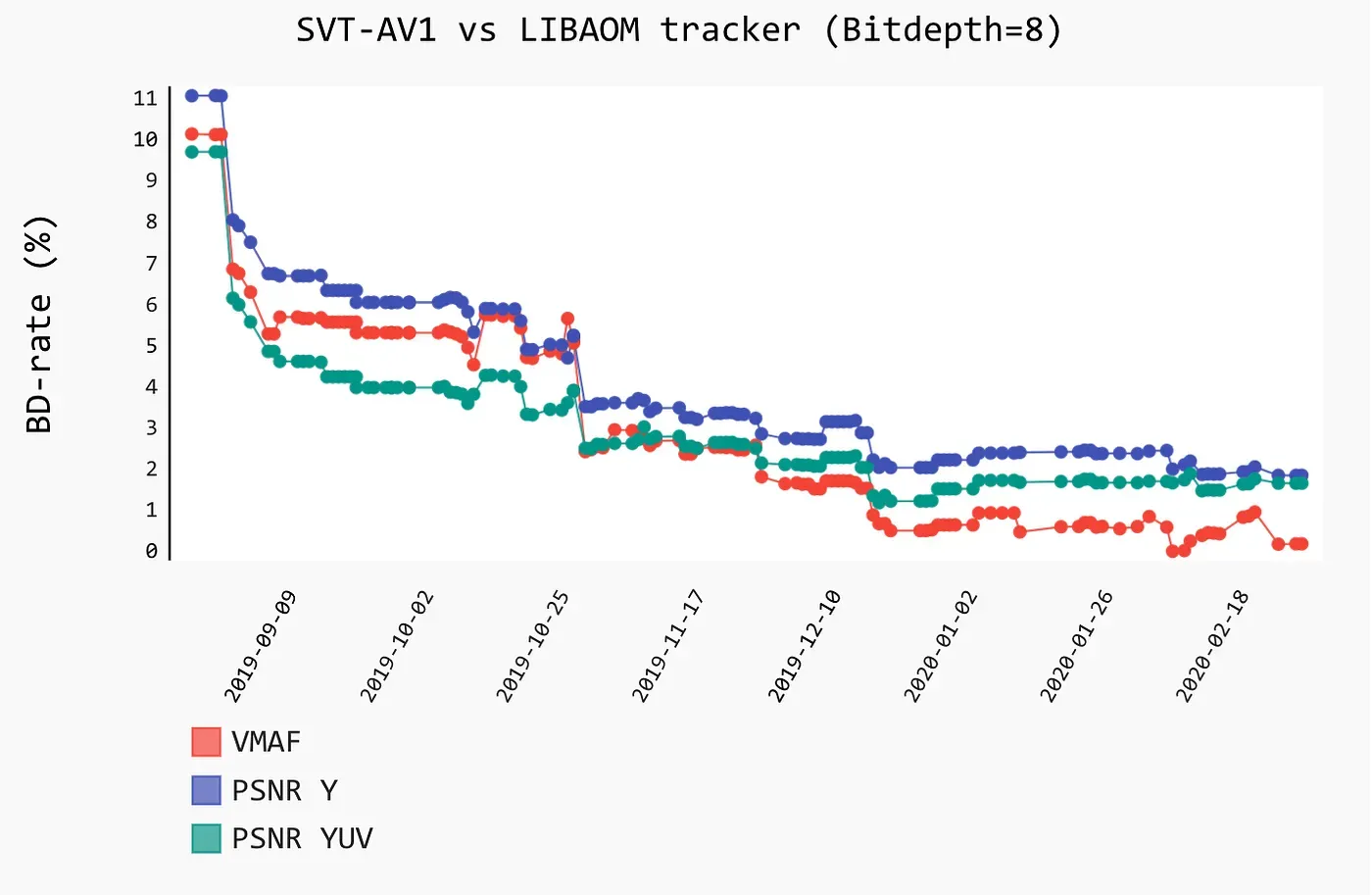
It wasn't until Intel and Netflix announced SVT-AV1 in 2019, a super efficient and scalable software AV1 encoder. YouTube finally doesn't have to wait for chip vendors to adapt, because encoding is finally somewhat viable with SVT-AV1. Ever since, YouTube has really pushed for AV1 adoption, for the money saving reasons above. Google, seeing the early success of AV1, even designed a second-generation Argos chip (VCU) to mass-encode AV1 at scale.
On the client side, however, which in my case was Android, we personally faced lots of issues with AV1 adoption. AV1 isn't just encoding intensive, but also decoding intensive. YouTube has several billions of Android users, and many of their devices are running on incredibly fragile or old hardware. Ideally, everyone's phone would have an AV1 hardware decoder, which is several times faster and more power efficient than a software decoder, but Android did not even enforce AV1 hardware decoding support until Android 14 in late 2023. As a result, many devices before that time did not come with an AV1 hardware decoder, so we had to rely on bundling a software AV1 decoder called dav1d.
Most of the issues we ran into were not because of dav1d, but actually just physical device limits. We're lucky to have incredibly good QoE (Quality of Experience) data, so we are able to see where users are struggling with things like buffering events and other miscellaneous issues, but we often had to create lots of workarounds and/or impose device limits like resolution so that the phone did not thermal throttle or struggle to play super high-resolution or high frame-rate content that it wasn't able to. Part of our job was to take what the client is sending us (device hardware, network conditions) and trying to predict which AV1 format to serve down so that our users wouldn't have to face playback issues.
You might ask, what about iPhones? Unlike Android, Apple has a very strict grasp of both the software and hardware of Apple devices. There is only a limited amount of phone models you can choose from, and their hardware is strictly regulated. The same can't be said for Android, because Google only owns the Android software itself, and not any actual hardware. While Android can mandate regulations like AV1 hardware decoding after a certain API level, it does not stop hardware manufacturers from cutting corners. Even aside from AV1 itself, a lot of issues that I ended up running into had to do with things like graphics drivers being super finicky, which I had to work around.
Pushing the Limits Beyond Standard Playback
Despite all of these challenges, software AV1 eventually began working well enough for hundreds of millions of YouTube users. While we still run into hardware-specific bugs daily, adoption has become much more "stable," allowing us to look into other features besides just higher resolutions. Currently, software AV1 is capped at a low frame rate as a safe boundary to prevent mobile CPUs from melting down. So, what if we added support for higher frame rates like 60 FPS to make playback smoother? And what if we added support for HDR (High Dynamic Range), so the video looks substantially more vibrant and realistic?
HDR Decoding
If you are currently a Googler, visit go/brandoncli to find my intern presentation! You can find much more detailed design documentation on my work over the summer.
At the time of my internship, another full-time engineer was already running experiments for high-frame-rate playback. So, my summer project focused mainly on adding AV1 HDR decode to Android devices.
For context, many Android phones have had HDR screens dating back as far as 2016, but hardware decoding support for AV1 didn't really show up until late 2023. That means there are thousands of Android models that have HDR displays, but have no native hardware decode for AV1 — making software decoding the only way to bridge that gap.
What is HDR?
HDR (High Dynamic Range) is a display technology that makes images look way more vibrant by expanding the range of brightness, contrast, and color. Bright highlights in a shot, like sunlight reflecting off a surface, can reach much higher brightness levels than standard screens can handle, while deeper shadows (like the inside of a cave) stay detailed rather than turning muddy.
You can see the difference in the picture below: the sunlit mountain peaks pop out so much more, while darker elements like the trees and lake water have noticeably better contrast and color depth in comparison to SDR (Standard Dynamic Range).

Just like SDR, HDR comes in several different flavors, including HDR10, HDR10+, Dolby Vision, and HLG (Hybrid Log-Gamma). Each format handles metadata differently: HDR10 uses static metadata based on the brightest frame across the entire video, while Dolby Vision supports a 12-bit format that allows for even higher peak brightness. Display hardware doesn't always support every flavor either, since they are different formats under the hood.

HDR at YouTube
At YouTube, the transcoding pipeline doesn't support 12-bit HDR transcodes. It does support HDR10, HDR10+, HLG, and 10-bit Dolby Vision, but almost no consumer devices support true 12-bit HDR anyway — it's expensive to manufacture panels for it and mostly limited to niche setups like professional Hollywood reference monitors. Also, HDR transcoding only happens if the uploaded source was actually shot and exported in HDR, since you can't magically transcode SDR into real HDR. After discussing with my team, my summer project ended up just focusing on 10-bit anyways.
Normally, HDR is best handled directly by hardware decoders. Decoding HDR is significantly heavier on resources than SDR because you're processing a lot more raw data. For context:
- Each pixel in an 8-bit SDR video has 256 shades of brightness per color channel (2^8).
- Each pixel in a 10-bit HDR video jumps to 1,024 shades per channel (2^10).
Software decoding is already heavy on mobile CPUs, so asking it to crunch through 10-bit HDR on top makes things even tougher. To put things in perspective, software AV1 decoding is currently capped at 1080p so phones don't run into performance bottlenecks. Even at 1080p 30 FPS, decoding HDR10 demands roughly 50% more compute compared to standard SDR from local FFmpeg testing.
Hardware-decoded HDR has been supported on Android for a while across H.264, VP9 (another open-source codec developed by Google), and AV1. But software HDR decode was only wired up for H.264 and VP9 — not AV1. Even then, the software VP9 HDR implementation relied on a metadata hack where pixels were dithered, and brightness metadata was decoded and passed into the container. From there, a custom video renderer fed that brightness data into a shader to render the proper HDR effect on the display.
Software AV1 HDR for Android
In order to support software AV1 HDR for Android, a completely fresh implementation had to be written from the ground up. To address those performance worries, we needed to make changes across both the client and the server.
ExoPlayer Changes
For a very brief summary: the YouTube Android app relies on ExoPlayer (now part of AndroidX Media3), an open-source Android media library developed by Google. ExoPlayer handles low-level frame retrieval and rendering, and it even provides a simple out-of-the-box video player. Of course, YouTube builds its own custom, proprietary playback implementations on top of it.
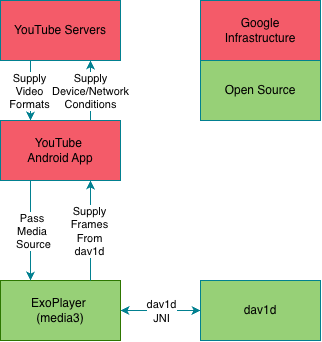
ExoPlayer interacts with the native dav1d library through a JNI wrapper called dav1d_jni.cc. It first instructs dav1d to extract YUV 4:2:0 frames out of the library. Then, using those frame buffers, ExoPlayer supports two main options to render our final video.
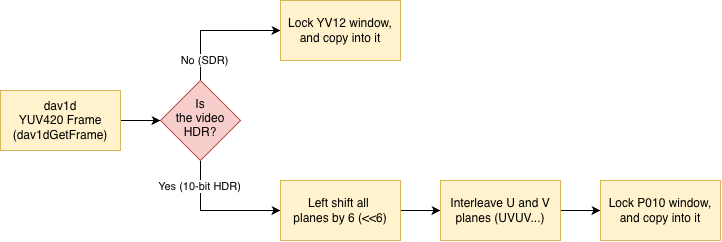
The first option is CPU-rendering, where ExoPlayer would lock the native window buffer for writing, and then copy the YUV 4:2:0 buffer into the YV12 window. The other option is GPU-rendering, where ExoPlayer would instead pass the YUV 4:2:0 buffer out of JNI into Java code, which then could be passed into a GLSL shader to handle the rendering for you.
ExoPlayer itself did not support AV1 software HDR decode for either of these rendering options, so I had to communicate with the ExoPlayer team and make open-source changes to support the decoding changes. (It's funny because some of the ExoPlayer maintainers I see on GitHub are also the people I interacted with on a day-to-day basis). At first, we opted for a surface rendering approach because we thought that would just be what's necessary. YV12 does not support HDR formats, so we had to use a semi-planar hardware buffer format called P010, which is what Android recommends.
Unlike YV12, we can't just directly copy the YUV 4:2:0 buffers out from dav1d and into the P010 buffer format. P010 stores 10-bit samples inside 16-bit integers, requiring the data to be MSB-justified (so shifted left by 6 bits), and the chroma planes had to be interleaved (UVUV...) before locking the native window buffer. I also had to keep track of different buffer format states, since video playback could switch between SDR and HDR, and therefore, the window buffer would have to change as well.
Since ExoPlayer is fully open-source on GitHub, you can actually check out my public commit here: androidx/media@79ef387. (Sadly, I hadn't properly linked my Google Git authentication at the time, so my personal handle doesn't show up on it, but that's me!) Funnily enough, this commit is actually a rollback of a rollback (a roll-forward). I accidentally wrote a slightly flaky unit test in my first commit, which triggered an automated rollback before I quickly patched the test and pushed it back through.
Server Changes
Besides the actual client rendering pipeline, the Android app had to advertise its HDR capabilities back to YouTube's servers so they knew the device could handle it. By querying the display's HDR capabilities, the app could forward that info upstream.
On the server side, I had to tweak the format selection logic so these HDR streams wouldn't get filtered out and could actually make it down to the client. I also had to make sure we capped resolutions so phones wouldn't try playing high resolution streams they had little chance of software decoding. (Fun fact: this is handled by the exact same server logic that bumps your video quality up or down when your connection shifts, like jumping from Wi-Fi to cellular!) Most of this stuff is internal to YouTube, so I can't get deep too much, but the bulk of the hard work was on the client side anyway.
Device Testing and Deployment
You would think things would just work fine after that, but of course that wasn't the case. If you read from this blog earlier, you already know that Android is notoriously finicky when it comes to this kind of thing.
At first, when I tested my end-to-end pipeline on the Google Pixel 6 Pro (forcing the dav1d software decode pipeline on its HDR display), everything worked flawlessly. The HDR worked, and I could clearly see the brightness differences, which was great. But when I tested it on older devices like the Pixel 5 or the Pixel 3, it literally boot-looped the phone.
As it turns out, many older phones don't actually support the P010 format properly. Digging through adb logs, I found out that very old phones like the Pixel 3 didn't have the graphics driver support for P010, which caused format crashes in Skia (Android's 2D graphics engine). Under the hood, Android's gralloc HAL on those older chipsets only permitted GPU hardware read/write flags for 10-bit buffers. The moment our CPU-rendering attempted a software write lock, the driver threw an exception.
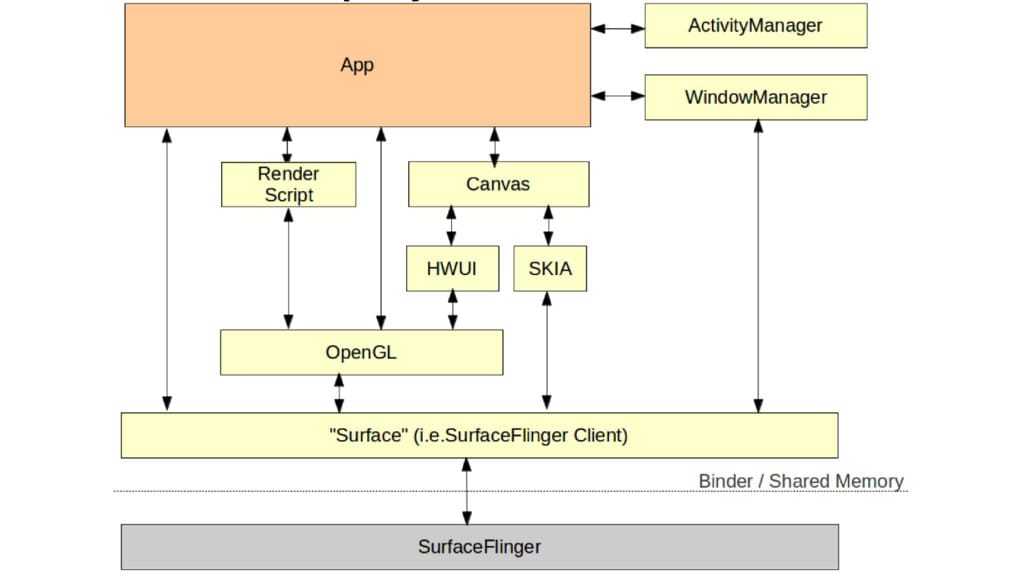
On the other hand, phones like the Pixel 5—which claimed to support P010—actually only supported it for GPU memory paths. That meant our CPU-based surface rendering path crashed the phone whenever it attempted to lock the buffer, because the hardware didn't allow CPU-memory modification on that hardware buffer format. Even re-flashing the Pixel 5 to the latest Android version didn't fix it, because at the end of the day, it was a hardware limitation.
Addressing Hardware Limitations
To address these changes, I decided to switch from CPU to GPU rendering. Unlike the CPU path—which relied on really fragile hardware support—the GPU path let me just take the buffer and write a GLSL shader to render it directly. OpenGL ES / GLSL 3.0 supports HDR rendering out of the box, and it’s basically standard across Android devices anyway.
I left ExoPlayer untouched and built a custom renderer in YouTube using the AndroidX Graphics library. From there, I used a GLFrameBufferView and wrote an HDR shader that could render the entire buffer in one go. In the end, I had a working, reliable HDR implementation up and running.
OpenGL Shader Pipeline
Besides just AV1, another really cool part of my internship was working on video shaders. At the time, we were playing around with shaders to see if they could actually make the watch experience better. Shaders like super-resolution or film grain were super interesting to us because they offload heavy work from the CPU to the GPU — which helps not just AV1, but software decoding across the board.
At the time, Android didn’t really have a clean way for engineers to prototype and test video shaders directly on live playback. So I ended up building the shader pipeline and an internal developer debug menu completely from scratch.
The main problem with how Android handled playback was that frames were being rendered directly to the display surface. There was no middle ground where we could hook in and run a shader pass before the frame hit the screen. To get around this, I rewired the pipeline to render into an OpenGL OES texture (GL_TEXTURE_EXTERNAL_OES) instead. I built a custom renderer that accepted the user's actual surface, intercepted the frame onto that external texture, ran whatever custom shader pass we wanted, and then drew the final result out to the display.
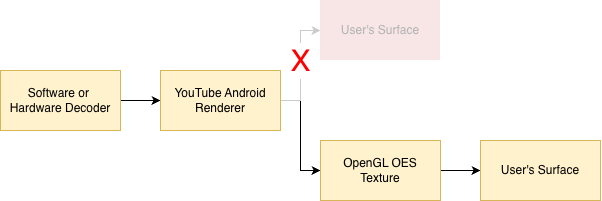
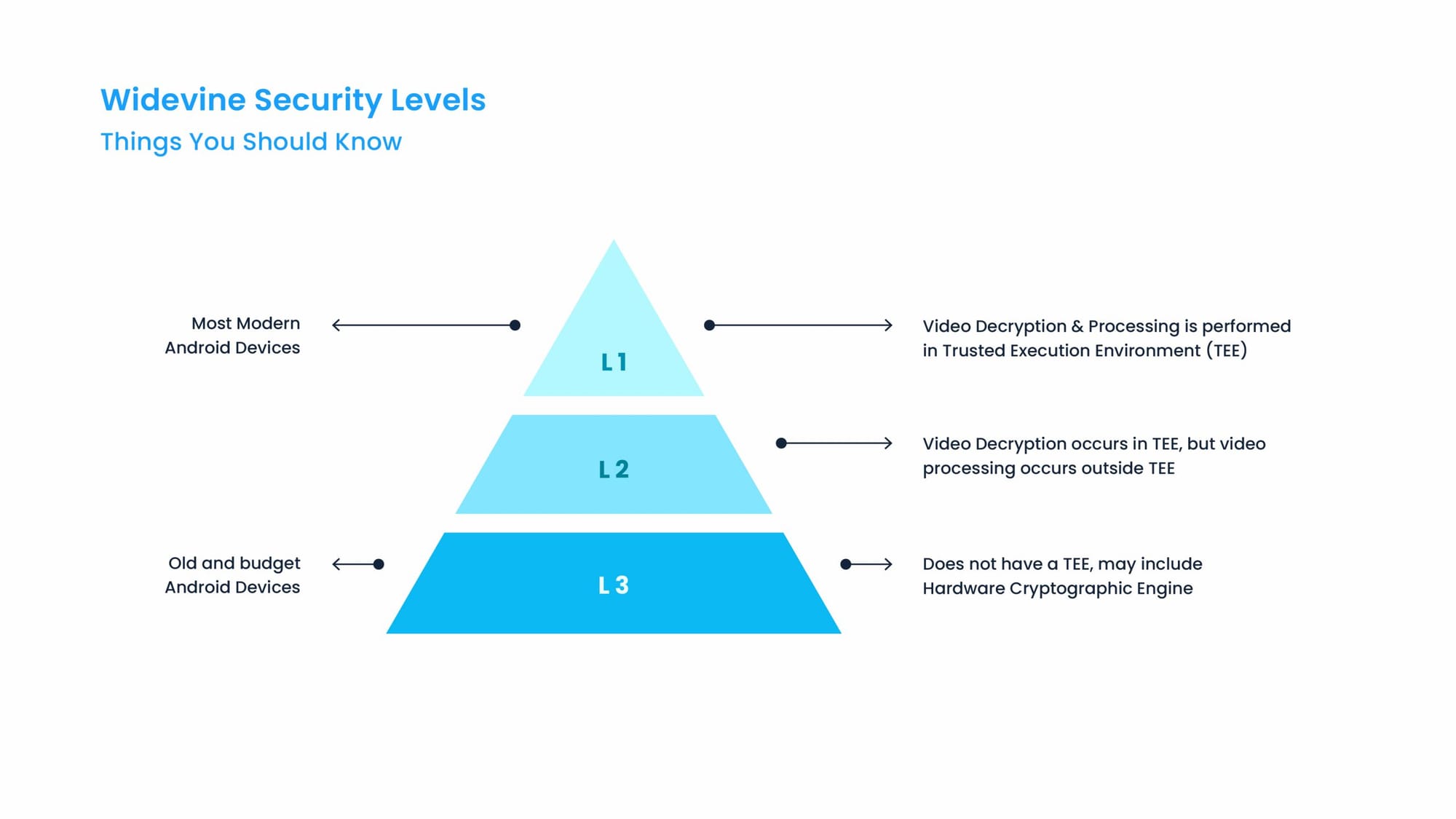
Using an OpenGL OES texture was super important here because we still needed to support L3 Widevine DRM (Digital Rights Management) content.
DRM is basically anti-piracy tech used to stop people from ripping movies and shows. If you’ve ever tried screen-sharing Netflix or Disney+ over a Discord call and everyone just sees a black screen, that’s DRM. Google’s Widevine DRM breaks down into three tiers — L1, L2, and L3 — though L2 is ignored across the industry since barely any devices support it.
In our case, L3 DRM means we can actually see the video buffers in user memory from software. We needed that because we had to pass the buffer into our GLSL shader program before rendering it out to the user's surface. I didn’t end up having time to dig into L1, but it’s likely possible down the road using OpenGL protected textures.
After building that pipeline out, I threw together a simple internal UI that only developers could access by tapping the gear icon whenever a video played. You could pick between different shaders, toggle them on and off, and change their settings to see the video change in real time.
Of course, I ran into some annoying shader compilation bugs while juggling all the different renderers YouTube uses. I also remember some hardware decoders straight up refused to cooperate, especially the low-latency ones. They expected us to render directly to the user's native surface to keep delay at a minimum, so they threw errors whenever we backed their output with an intermediate SurfaceTexture instead.
AV1 Film Grain Synthesis (AV1)
For a week or two of my internship, I also did some research into AV1 Film Grain Synthesis (FGS) to see if it was feasible on mobile. Just like with the shaders I worked on earlier, we wanted to find ways to offload parts of software decoding from the CPU to the GPU. Since software AV1 decoding is already super heavy on phones, looking into post-processing steps like film grain was a natural place to start.
As it turns out, AV1 film grain is complex. During encoding, film grain is stripped out from the original footage so the video can compress way better, and then it's synthetically regenerated and blended back in while the video is being decoded. But that synthesis step on its own is crazy demanding—benchmarks show it can add anywhere from 15% to 35% more computational overhead to decoding. On top of that, the math isn't straightforward at all (if you want the deep dive, check out this Netflix TechBlog post).
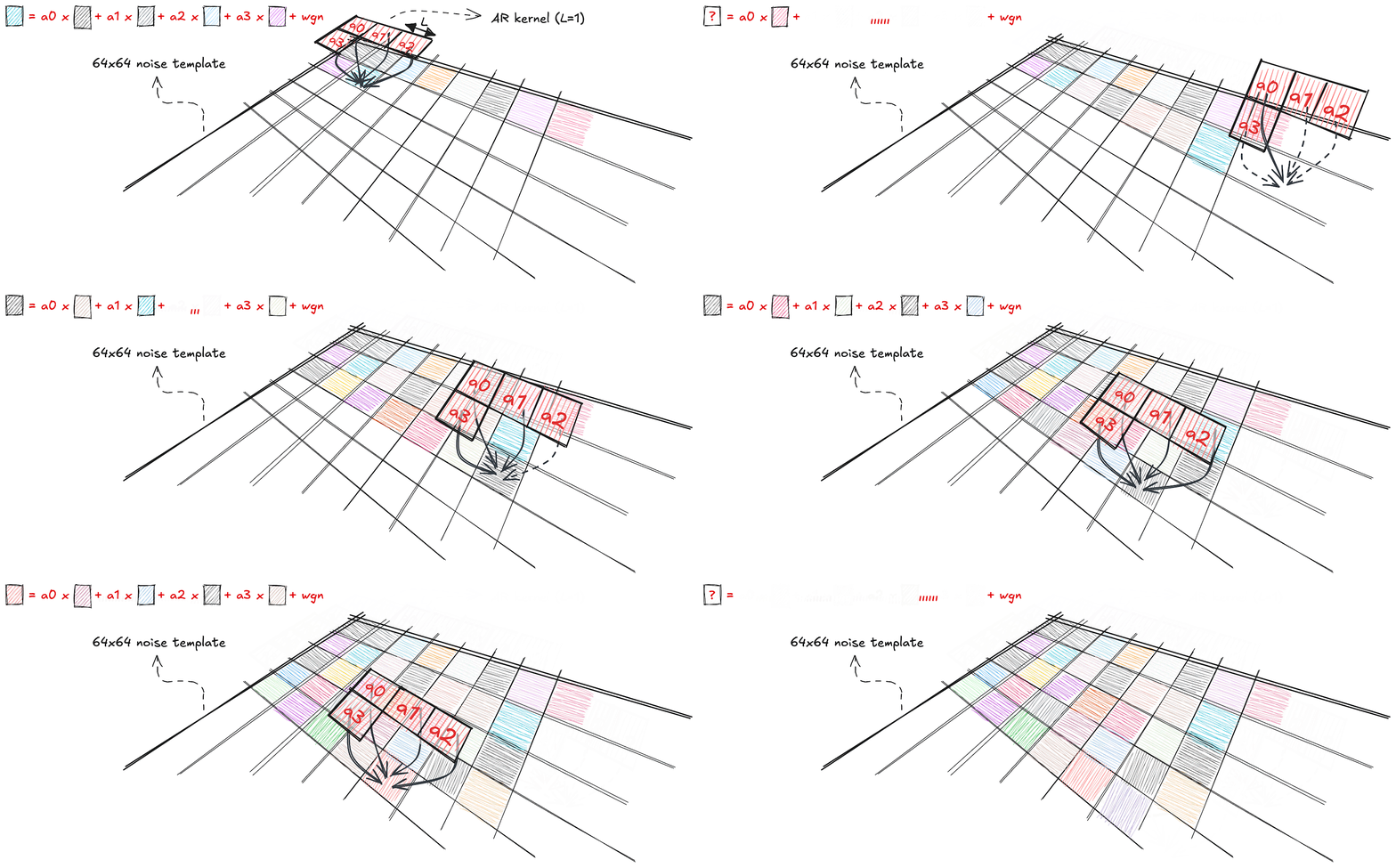
Right now, dav1d handles all of that synthesis on the CPU. It’s definitely possible to move it to the GPU by adapting parts of the algorithm — which is what projects like libplacebo do. But during my internship, we ran into licensing issues and couldn't get approval cleared before my summer wrapped up, so I didn't get the chance to build out a working prototype.
Conclusion
That wraps up my work on AV1, HDR, shaders, and film grain! Instead of typical app UI work you might think, my summer was almost entirely low-level systems and graphics.
On top of that, I fixed some random memory leaks and wrote up onboarding docs to help future interns get up to speed. If you have any other questions, feel free to drop a comment below!

Comments ()